Saturday, April 25, 2020

Secret Hack Codes For Android Mobile Phones

Secrete Hack codes for Android Mobile phones

Secret hack codes are usually hidden from users to prevent misuse and exploit. Android is a very new platform so there aren't many hack codes for Androids available. Today I will share all of the hack codes of Android cellphones that I know. I have tested these codes on my Samsung Galaxy with the Android OS version 2.2. I am sure these will work on all previous versions. 


Secret Hack Codes for Android Mobile Phones:


1. Complete Information About Your Phone 

 *#*#4636#*#*

 This code can be used to get some interesting information about your phone and battery. It shows the following 4 menus on the screen:

  • Phone information
  • Battery information (How to maximize or boost battery life in android phones)
  • Battery history
  • Usage statistics


2. Factory data reset


*#*#7780#*#*

This code can be used for a factory data reset. It'll remove the following things:

  • Google account settings stored in your phone
  • System and application data and settings
  • Downloaded applications

It will NOT remove:

  • Current system software and bundled application
  • SD card files e.g. photos, music files, etc.

Note: Once you give this code, you will get a prompt screen asking you to click on the "Reset phone" button, giving you the chance to cancel your operation.


3. Format Android Phone


  *2767*3855#

Think before you input this code. This code is used for factory formatting. It will remove all files and settings, including the internal memory storage. It will also reinstall the phone firmware.

Note: Once you give this code, there is no way to cancel the operation unless you remove the battery from the phone.


4. Phone Camera Update


*#*#34971539#*#*

This code is used to get information about phone camera. It shows following 4 menus:

  • Update camera firmware in image (Don't try this option)
  • Update camera firmware in SD card
  • Get camera firmware version
  • Get firmware update count

WARNING: NEVER use the first option. Your phone camera will stop working and you will need to take your phone to a service center to reinstall camera firmware.


5. End Call/Power


*#*#7594#*#*

This one is my favorite. This code can be used to change the action of the "End Call/Power" button. Be default, if you hold the button down for a long time, it shows a screen asking you to select between silent mode, airplane mode, and power off.

Using this code, you can enable this button to power off without having to select an option, saving you some time.


6. File Copy for Creating Backup


*#*#273283*255*663282*#*#*


This code opens a file copy screen where you can backup your media files e.g. images, sound, video and voice memo.


7.  Service Mode


*#*#197328640#*#*

This code can be used to enter into service mode. In service mode, you can run various tests and change settings.


8. WLAN, GPS and Bluetooth Secret Hack Codes for Android:


*#*#232339#*#* OR *#*#526#*#* OR *#*#528#*#*           – WLAN test (Use "Menu" button to start various tests)

*#*#232338#*#*                  – Shows WiFi MAC address

*#*#1472365#*#*                – GPS test

*#*#1575#*#*                      – Another GPS test

*#*#232331#*#*                  – Bluetooth test

*#*#232337#*#                    – Shows Bluetooth device address


9. Codes to get Firmware version information:


*#*#4986*2650468#*#* – PDA, Phone, H/W, RFCallDate

*#*#1234#*#* – PDA and Phone

*#*#1111#*#* – FTA SW Version

*#*#2222#*#* – FTA HW Version

*#*#44336#*#* – PDA, Phone, CSC, Build Time, Changelist number


10. Codes to launch various Factory Tests:


*#*#0283#*#* – Packet Loopback

*#*#0*#*#* – LCD test

*#*#0673#*#* OR *#*#0289#*#* – Melody test

*#*#0842#*#* – Device test (Vibration test and BackLight test)

*#*#2663#*#* – Touch screen version

*#*#2664#*#* – Touch screen test

*#*#0588#*#* – Proximity sensor test

*#*#3264#*#* – RAM version


@EVERYTHING NT

Related word

  1. Hacking Web Sql Injection
  2. Hacking Etico Que Es
  3. Wargames Hacking
  4. Paginas De Hacking
  5. Hacking With Python
  6. Life Hacking
  7. Hacking Basico
  8. Growth Hacking Pdf
  9. Hacker Profesional

Thursday, April 23, 2020

DEFINATION OF HACKING

DEFINATION OF HACKING

Hacking is an attempt to exploit a  computer system vulnerabilities or a private network inside a computer to gain unauthorized acess.
Hacking is identifying and exploiting weakness in computer system and/ or computer networks for finding the vulnerability and loopholes.
Related articles
  1. Hacking Videos
  2. Hacking Definition
  3. IngenierĂ­a Social. El Arte Del Hacking Personal Pdf
  4. Certificacion Ethical Hacking
  5. Growth Hacking Libro
  6. Hacking Wireless 101 Pdf
  7. Wargames Hacking
  8. Hacking Linux Distro
  9. Mindset Hacking Nacho

How To Secure Your Home Against "Internet Of Things" And FUD

TL;DR, most of the security news about IoT is full of FUD. Always put the risks in context - who can exploit this and what can the attacker do with it. Most story only covers the latter.

Introduction

There is rarely a day without news that another "Internet of Things" got hacked. "Smart" safes, "smart" rifles, "smart" cars, "smart" fridges, "smart" TVs, "smart" alarm systems, "smart" meters, "smart" bulbs, NAS devices, routers. These devices are getting hacked every day. Because most of these devices were never designed with security as a goal, and some of them have been never tested by security professionals, it is no surprise that these things are full of vulnerabilities.


Independent security researchers find these vulnerabilities, write a cool blog post or give a presentation about the vulnerability and the exploit, and the media forgets the constraints just for the sake of more clicks. "We are all doomed" we can read in the news, but sometimes the risks are buried deeply in technical jargon. Please note I blame the news sites here, not the researchers.

http://www.slideshare.net/danielmiessler/iot-attack-surfaces-defcon-2015

There are huge differences between the following risks:

  • Attackers can directly communicate with the router (or camera) from the Internet without authentication and exploit the vulnerability. This is the worst-case scenario. For example, an automated ransomware attack against your NAS is pretty bad.
  • Attackers have to position themselves in the same WAN network (e.g. Sprint mobile network in the case of Jeep hacking) to exploit the vulnerability. This is still pretty bad.
  • The vulnerable code can not be triggered directly from the Internet, but tricks like CSRF can be used to exploit it (details later in this post). 
  • The vulnerable code can not be triggered directly from the Internet, and it uses a protocol/port which prevents Cross Protocol Scripting. Attackers have to access the local network before exploiting this vulnerability.
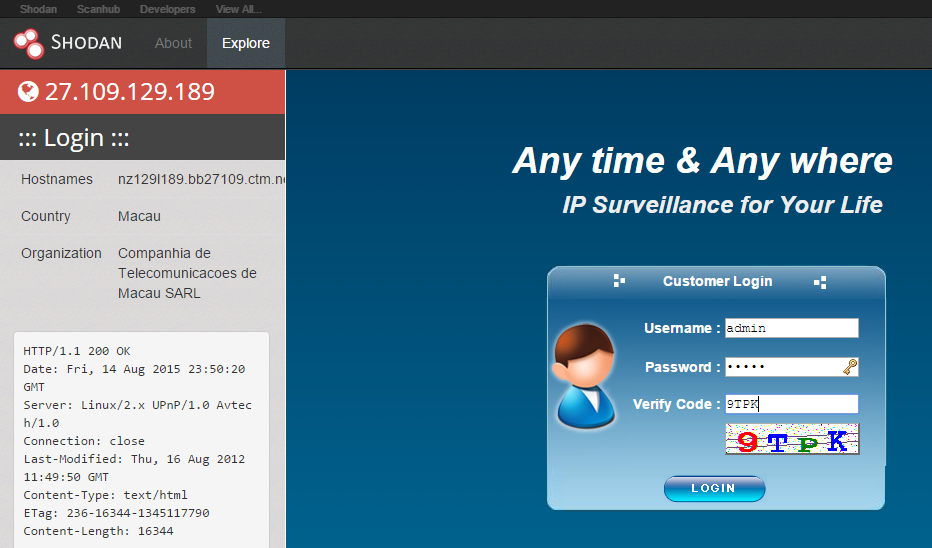
As it is the case with the worst scenario, one can find a lot of devices connected to the internet. You can always find funny stuff at http://explorer.shodanhq.com/#/explore , or use the nmap screenshot script to find your own stuff :)


Network exposure

Most devices are behind an IPv4 NAT device (e.g. home router), thus can not be reached from the Internet side by default. Except when the device configures the firewall via UPNP. Or the device has a persistence cloud connection, and the cloud can send commands to the device. Or the device uses IPv6 tunneling (e.g. Teredo), thus it is reachable from the Internet. But not every vulnerability on your home network is accessible directly from the Internet. As more and more devices and networks will support IPv6, this scenario might change, but I hope most home routers will come with a default deny configuration in their IPv6 firewall module. On the other hand, scanning for IPv6 devices blindly is not feasible due to the large number of IPv6 addresses, but some tricks might work. 

If attackers can not access the device directly, there is a way to hack it through the user's browser. Just convince the victim user to visit a website, and via CSRF (Cross Site Request Forgery) and brute-forcing the device IP, it is possible to hack some devices (mostly through HTTP - if the exploit can fit into simple GET or POST commands.

If attackers can not attack the device vulnerability through the Internet directly, or via CSRF, but have connected to the same network - the network exposure shrinks significantly. And when attackers are on the same network as you, I bet you have bigger problems than the security of the IoT devices ...

Recommendations for home users

Don't buy **** you don't need

Disconnect from the power cord the IoT devices you don't need to operate 7*24. 

Disable cloud connectivity if it is not necessary. For example, I have a NAS device that can be reached through the "cloud", but I have disabled it by not configuring any default gateway for the device. I prefer connecting to my network via VPN and reach all my stuff through that.

Prevent CSRF attacks. I use two tricks. Don't use the 192.168.0.x - 192.168.10.x network at-home - use an uncommon IP range instead (e.g. 192.168.156.x is better). The second trick is I configured my Adblock plugin in my primary browser to block access to my internal network. And I use another browser whenever I want to access my internal devices. Update: On Firefox you can use NoScript ABE to block access to internal resources.


Check your router configuration:

  • disable UPnP
  • check the firewall settings and disable unnecessary port forwards
  • check for IPv6 settings, and configure the firewall as default deny for incoming IPv6 TCP/UDP.

Change default passwords, especially for services connected to the Internet. Follow password best practices.

Run Nmap to locate new IoT in your home network :) 

Run a WiFi scan to locate new WiFi access points. Let me share a personal experience with you. I moved to a new house and brought my own WiFi router with me. I plugged it in, and forget about WiFi. Months later it turned out I had two other WiFi devices in my house - the cable modem had its own integrated WiFi with default passwords printed on the bottom, and the Set-top-box was the same - default WiFi passwords printed on the bottom. And don't forget to scan for ZigBee, Bluetooth, IrDA, FM, ...

Update your devices - in case you have a lot of free time in your hand.

Don't allow your guests to connect to your home network. Set up a separated AP for them. Imagine your nephew stealing your private photos or videos from your NAS or DNLA server.

With great power, comes great responsibility. The less device you own in your house, the less time you need to maintain those.

Read the manuals of your devices. Be aware of the different interfaces. Configure it in a secure way.

Disable Teredo protocol in case you don't need IPv6.

Stop being amazed by junk hacking.

Update: Disable WebRTC: https://www.browserleaks.com/webrtc , in Chrome you can use this extension: https://chrome.google.com/webstore/detail/webrtc-network-limiter/npeicpdbkakmehahjeeohfdhnlpdklia

Update: Prevent against DNS rebind attacks via configuring a DNS server which can block internal IP addresses. OpenDNS can block internal IP, but this is not a default option, you have to configure it.

Recommendations for vendors

For vendors, I recommend at least the followings:

  • Implement security during Software Development LifeCycle
  • Continuous security testing and bug bounties
  • Seamless auto-update
  • Opt-in cloud connectivity

Recommendations for journalists

Stop FUD. Pretty please.

The questions to ask before losing your head

  • who can exploit the vulnerability?
  • what prerequisites do we have about the attack to successfully exploit the vulnerability? Is the attacker already in your home network? If yes, you have probably bigger problems.
  • what can the attacker do when the exploit is successful?

And last but not least, don't forget that in the case of IoT devices, sometimes users are the product, not the customer. IoT is about collecting data for marketing purposes.


More info


$$$ Bug Bounty $$$

What is Bug Bounty ?


A bug bounty program, also called a vulnerability rewards program (VRP), is a crowdsourcing initiative that rewards individuals for discovering and reporting software bugs. Bug bounty programs are often initiated to supplement internal code audits and penetration tests as part of an organization's vulnerability management strategy.


Many software vendors and websites run bug bounty programs, paying out cash rewards to software security researchers and white hat hackers who report software vulnerabilities that have the potential to be exploited. Bug reports must document enough information for for the organization offering the bounty to be able to reproduce the vulnerability. Typically, payment amounts are commensurate with the size of the organization, the difficulty in hacking the system and how much impact on users a bug might have.


Mozilla paid out a $3,000 flat rate bounty for bugs that fit its criteria, while Facebook has given out as much as $20,000 for a single bug report. Google paid Chrome operating system bug reporters a combined $700,000 in 2012 and Microsoft paid UK researcher James Forshaw $100,000 for an attack vulnerability in Windows 8.1.  In 2016, Apple announced rewards that max out at $200,000 for a flaw in the iOS secure boot firmware components and up to $50,000 for execution of arbitrary code with kernel privileges or unauthorized iCloud access.


While the use of ethical hackers to find bugs can be very effective, such programs can also be controversial. To limit potential risk, some organizations are offering closed bug bounty programs that require an invitation. Apple, for example, has limited bug bounty participation to few dozen researchers.

Related articles


  1. Linux Hacking Distro
  2. Tipos De Hacker
  3. Grey Hat Hacking
  4. Curso De Growth Hacking
  5. Growth Hacking Instagram
  6. Hacking Games

Wednesday, April 22, 2020

November 2019 Connector

OWASP
Connector
November 2019

COMMUNICATIONS


Letter from the Vice-Chairman

Dear OWASP Community, 

Preparation for next year's conferences is underway. I had the pleasure of meeting people from our community at a recent ISACA Ireland event where I had an OWASP stand. I also had lots of swag to give away, loads left which I plan to share out amongst the community. 

I was on a call recently with both WIA leadership and a number of individuals looking to broaden our diversity reach, forming DIA (diversity in AppSec). This was a positive call and I look forward to reviewing their proposal under the committee 2.0 operating model.

I'd like to thank our volunteers, chapter and project leaders for making OWASP what it is today. We wouldn't have a foundation without you. We always want to make things better, to this end, it would be great if you could fill out the following feedback form.

Thank you, 
Owen Pendlebury, Vice-Chairman

FROM THE EXECUTIVE DIRECTOR


As we wind down 2019, we are planning lots of new opportunities to get involved with OWASP next year. The current working draft of the 2020 Operating Plan can be found on our staging site for our new website which is planned to launch next month.
 
Some of the highlights for 2020:
  • Quarterly Town Hall meetings.
  • Two Project Summits - the first in February 2020
  • Pilot single-day AppSec Days worldwide to offer local training and community.
We are also set to further increase the transparency of the daily workings of OWASP through our Staff Projects page. The pages linked there will always be a work in progress; some of which today are still only templates but still a great resource to know what's going on at OWASP.

All of this which adds to our Global and Regional Events, ongoing local chapter support, and other member activities. Our plans are ambitious and we look forward to your continued support this and every month as we look to better secure the web.


OWASP Foundation Global AppSec Event Dates for 2020

Global AppSec Dublin, June 15 - 19, 2020
(Formerly known as AppSec EU)
Sponsorship is now available
Call for Papers & Call for Training December 2019
 
Global AppSec San Francisco, October 19 - 23, 2020
(Formerly known as AppSec US)
CFP &  CFT February 2020

** Visit our website for future announcements.**
NEW OWASP Project Summit - Winter 2020
February 2020 in Cancun, Mexico

 
The OWASP Foundation will host a three-day working session for FIVE selected projects in Cancun, Mexico, February 2020. Arrival day will be Wednesday the 19th and departures will be the 23rd. Projects must apply and then get selected to participate. The application process will require project meeting goals, work plans, key contributors, and expected attendance. The OWASP Foundation Officers Group will make the final selection. For more information click here. 

You can also email Emily Berman Global Events Director or Harold Blankenship Director of Technology and Projects.
Announcing a New Opportunity to become part of a Global AppSec Program Team
 
Conference Program Teams are constituted for each Global AppSec event and consists of members of OWASP members and staff. The selection of team members is based on subject-matter expertise and a balanced representation of the OWASP community. For planning purposes, team members shall reside on the continent of the Global AppSec for which they serve. Teams are constituted no later than six months prior to the Global AppSec event.

To apply to become a member of the Conference Program Team click here.


We are so excited to announce that both the London OWASP and WIA community have been asked to speak at BlackHat Europe 2019 on Wednesday 4 December at the EXCEL London.   Andra Lezza is leading the panel of women to "Share insights gained at different stages of their careers to help other women in the field."  Thank you, Andra, for leading the initiative and also to Sonya Moisset, Bibi Sanjarani, Katy Anton and Lauren Chiesa for volunteering to be part of the panel.  Also from the OWASP Community and a London Chapter Leader Sam Stepanyan and Paul Harragan.  Sam and Pau will be presenting a more in-depth demo on the OWASP Nettacker.  Good luck to all the speakers have a great conference.

I would like to encourage all of the OWASP community that will be attending BlackHat Europe to please make every effort to attend and support our fellow OWASP members Wednesday, 4 December 2019. (Click to view the schedule details.)

OWASP Members don't forget you are eligible for € 200.00 discount, email marketing@owasp.org for code to use when registering.


BlackHat Europe has extended an invitation to our London WIA community  to  lead a panel to "Share insights gained at different stages of their careers that could help other women in the field."  Thank you to Andra Lezza for leading this initiative and Sonya Moisset, Bibi Sanjarani, Katy Anton and Lauren Chiesa for volunteering to be part of the panel and to contribute.  Good luck I am sure your session will be a huge success.

BlackHat Europe 2019 London at EXCEL London
2019 December 2-5 
The OWASP Booth 1015
Business Hall December 4 & 5 
December 4, 10:30 AM - 7:00 PM
December 5: 10:00 AM - 4:00 PM

EVENTS 

You may also be interested in one of our other affiliated events:


REGIONAL EVENTS
Event DateLocation
German OWASP Day 2019 December 10, 2019 Karlsruhe, Germany
AppSec California 2020 January 21 - 24, 2020 Santa Monica, CA
OWASP New Zealand Day 2020 February 20 - 21, 2020 Auckland, New Zealand
OWASP Seasides March 3 - 5, 2020 Panjim Goa, India
SnowFROC 2020 March 5, 2020 Denver, CO
AppSec Morocco & Africa 2020 June 4 - 5, 2020 Rabat, Morocco

GLOBAL PARTNERSHIP EVENTS
Event Date Location
BlackHat Europe 2019 December 2 - 5, 2019 London

PROJECTS


As the foundation moves toward the migration of the OWASP web presence from the old wiki site to our new Github-hosted home, some of you may still have questions regarding what to move and how to move it. Essentially, if you have a chapter page or project page and you have not migrated it to the new website, that would be first. Steps on what to do and what is needed can be found at https://www2.owasp.org/migration There are also some minor instructions on the default project or chapter page itself. And if you are wondering where that page is located, you can go to https://github.com/OWASP and type your chapter name in the repository search bar. If your project or chapter is not there, contact me. Lastly, there are a number of excellent examples already done by other leaders (also linked on the migration page).

And, as a precaution, you should click over into the 'Settings' of your repository and then click the 'Collaborators & teams' link on the left menu and check to make sure that the usernames added to Collaborators match what you expect.  Having someone you do not know edit your web page without your knowledge is no longer the expected behavior.

Some resources, mostly for projects, have been uploaded to the OWASP Site Theme Repository and can be linked to via the /assets/image/common/<file> URL.

After your chapter or project page is done, there is a www-community repository which would include any files from the wiki that are not currently in a project or chapter or board/staff policy area.  For instance, there are pages there for GSoC and XSS and CSRF.  A list of the top pages that need to be migrated can be found attached to one of the TODO cards on our website migration Trello board which you are invited to join if you want to help migrate loose pages and/or perform some automation work.

Our current plan can be found on the Website Relaunch project page.

PROJECT ANNOUNCEMENT

As part of OWASP's participation in Google's Season of Docs, the ZAP project has had Nirojan Selvanathan (@sshniro)  working on API documentation.  The first iteration of the documentation is now live.  It includes Java, Python, and shell
example snippets all presented in a responsive and accessible design which we will continue to build on in the future.

Big thanks to Nirojan for his efforts on this wonderful initiative!
Congratulations and thanks to Google Open Source for helping to bring the open-source and technical writer communities together!

COMMUNITY

 
Welcome to our New OWASP Chapters

Colombo, Sri Lanka
Des Moines, IA
Harrisburg, PA
Louisville, KY
Monterrey, Brazil
Moscow, Russia


Contributor Corporate Members


*Ads and logos are not endorsements and reflect the messages of the advertiser only. *
Join us
Donate
Our mailing address is:
OWASP Foundation 
1200-C Agora Drive, #232
Bel Air, MD 21014  
Contact Us
Unsubscribe


This email was sent to *|EMAIL|*
why did I get this?    unsubscribe from this list    update subscription preferences
*|LIST:ADDRESSLINE|*